Applicable Versions: 3.00 and Later
Symptoms
When you run the DataPA Installation on a machine with IIS7 installed, the installer does not show DataPA Enterprise as an available feature.
Solution
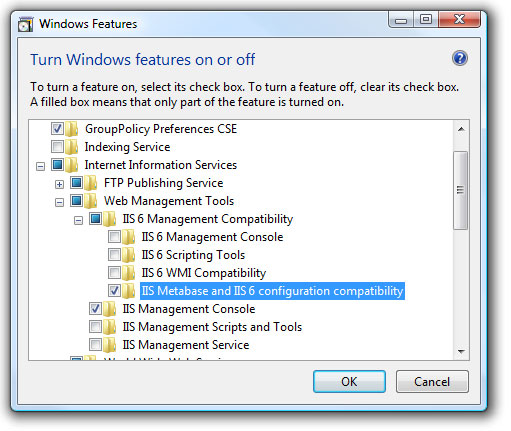
The issue is that DataPA Enterprise requires IIS7 to have IIS6 Metabase and IIS6 configuration compatibility to be set. As such, the installer will check for this setting, and if it is not available, will not offer DataPA Enterprise as a feature. Follow the steps below to resolve this issue:
- From the Control Panel in Windows, select Programs and Features.
- Select Turn Windows Features on or off.
- Expand the Internet Information Services branch.
- Expand the Web Management Tools branch.
- Expand the II 6 Web Management Compatibility branch.
- Check the IIS6 Metabase and IIS6 configuration compatibility check box.
- Press OK.
- Run the DataPA installation again, the DataPA Enterprise feature is now available.