
/ Help centre
← All articles
End Users › General

When I try and export a report that contains Unicode characters to a PDF document, I get an error like ""-214746259 - ActiveReports PDF export error"".

Applicable Versions: All In order to export reports that contain Unicode fonts toi PDF documents, you must select Acrobat version 4.x and ensure you do not attempt to embed any fonts.The screenshot below shows the export dialog window. Follow these steps: Check the Advanced Options check box.…

Updated 26 March 2018

Applicable Versions: All


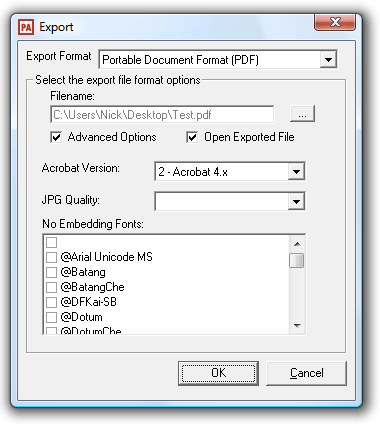
In order to export reports that contain Unicode fonts toi PDF documents, you must select Acrobat version 4.x and ensure you do not attempt to embed any fonts.The screenshot below shows the export dialog window. Follow these steps:

  1.  Check the Advanced Options check box.
  2. Select Acrobat Version 2- Acrobat 4.x
  3. Ensure no fonts are checked in the No Embedding Fonts list.

If you are exporting using the DataPA API, and the ActiveReportsPDFExport.ARExportPDF object, set the properties as below:

    exportObject.semiDelimitedNeverEmbedFonts = """"
    exportObject.AcrobatVersion = 2


Need a hand?

We’re here if you need a little more help.

Contact support ↗