
/ Help centre
← All articles
Administration › Installation

When I open DataPA Enterprise in a web browser, I get the error "No valid DataPA OpenAnalytics Enterprise license has been applied to this server". How do I fix this?

Applicable Versions: 4.05.000 Onwards To apply a license to a DataPA Enterprise server, you need to open one of the client applications (Enterprise Dashboard or DataPA Reports) and set the data location to the Enterprise Server. To do this, follow these steps; Open the Client Settings screen…

Updated 11 April 2018

Applicable Versions: 4.05.000 Onwards


To apply a license to a DataPA Enterprise server, you need to open one of the client applications (Enterprise Dashboard or DataPA Reports) and set the data location to the Enterprise Server. To do this, follow these steps;

  1. Open the Client Settings screen (security settings for version 4.5).
  2. Select the Data Location tab.
  3. Select Stored on a DataPA Enterprise Server.
  4. Enter the hostname or ip address of the server.
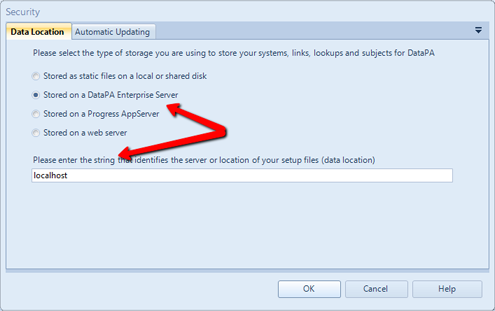

  5. Press OK. You will warned that the server is not licensed, and the license screen will open.
  6. Enter the license details and press OK.


Need a hand?

We’re here if you need a little more help.

Contact support ↗